THE NEW MUSORA APP
Explore fresh features & updates available now.
/marketing/musora/membership/the-new-musora-app/iphone-mockup-left-4.png)
/marketing/musora/membership/the-new-musora-app/iphone-mockup-center-new.png)
/marketing/musora/membership/the-new-musora-app/iphone-mockup-right-2.png)
SCROLL FOR MORE
PRACTICE
TRACKER
Log every practice. Celebrate every milestone.
/marketing/musora/membership/the-new-musora-app/practice-thumb.jpg)
AUTO-TRACK EVERY LESSON
/marketing/musora/membership/the-new-musora-app/1.png)
ADD YOUR OFFLINE SESSIONS
/marketing/musora/membership/the-new-musora-app/2.png)
TRACK YOUR PERSONAL STATS
/marketing/musora/membership/the-new-musora-app/3.png)
STREAKS
Consistent practice = Consistent progress
/marketing/musora/membership/the-new-musora-app/streak-thumb.jpg)
DO ANY LESSON TO START A STREAK
The Method, courses, songs, workouts, and watching livestreams all count towards your streak.
STREAKS ARE AUTOMATICALLY LOGGED
The app will log your streak in the Practice Tracker where you can view all of your practice sessions.
MAINTAIN YOUR STREAK
Start a lesson every week to keep your streak going! You can also start a daily streak by practicing each day.
Reach your goals faster
Streaks help you build better practice habits so you can reach your musical goals faster.
DO ANY LESSON TO START A STREAK
The Method, courses, songs, workouts, and watching livestreams all count towards your streak.
STREAKS ARE AUTOMATICALLY LOGGED
The app will log your streak in the Practice Tracker where you can view all of your practice sessions.
MAINTAIN YOUR STREAK
Start a lesson every week to keep your streak going! You can also start a daily streak by practicing each day.
Reach your goals faster
Streaks help you build better practice habits so you can reach your musical goals faster.
NEW STEP-BY-
STEP METHOD
Guided Learning Paths for beginners.
(Higher difficulty learning paths coming soon!)
/marketing/musora/membership/the-new-musora-app/method-thumb.jpg)
/marketing/musora/membership/the-new-musora-app/lisa.png)
Make the most of every practice with short, focused sessions that help you develop your skills and connect different musical concepts.
How? The Method is now organized into Learning Paths. Each path focuses on the core abilities you need for your skill level, using two key principles:
• Interleaved practice: Rotate between different skills – rhythm, technique, and musicality – so learning always feels engaging and exciting.
• Spaced practice: Revisit those same skills over time to help them really stick.
Learning Paths are made up of a daily set of 5-minute lessons. Each day, you’ll see a set of three lessons to complete. And along the way, you’ll be able to apply your skills to real Musora Original songs!
Ready to become a more confident musician? All you have to do is press play and follow your Learning Path.
Can I still find the old Method lessons?
Yes! Existing students will find the old Method lessons linked at the bottom of the new Method page.
Why did you change Method levels to Learning Paths?
The new Method solves three big problems every musician faces: What should I practice? How long should I practice it for? When am I ready to move on?
At the same time, it makes the experience fun, engaging, and practical!
Does my progress in the old Method transfer over to the new Method?
Not directly. But before you start a Learning Path, the system runs a check to see if you’ve already completed any of the lessons in the path.
If you have, you’ll be given the option to keep that progress or start the Learning Path over from the beginning. For the most effective and complete experience, we recommend starting the path from scratch!
When will you release more advanced Learning Paths?
When the new app launches, there will be three beginner-level Learning Paths for each instrument. We’re hard at work creating more for different skill levels, and will let you know when those are ready to go!
/marketing/musora/membership/the-new-musora-app/playbass-icon.svg) PLAYBASS
PLAYBASS
Bass guitar is here.
/marketing/musora/membership/the-new-musora-app/playbass-thumb.png)
Build your groove from the ground up with guided Learning Paths, Songs, courses from the world's best bass players, and more.
ARTIST COURSES
/marketing/musora/membership/the-new-musora-app/course-1.png)
With Moa Munoz
/marketing/musora/membership/the-new-musora-app/course-2.png)
With Ernest Tibbs
/marketing/musora/membership/the-new-musora-app/couse-3.png)
With Chris Wong
1,000 SONGS
/marketing/musora/membership/the-new-musora-app/song-1.png)
Knights of Cydonia
/marketing/musora/membership/the-new-musora-app/song-2.png)
Mr.Brightside
/marketing/musora/membership/the-new-musora-app/song-3.png)
Dreams
DEDICATED METHOD
/marketing/musora/membership/the-new-musora-app/level-1-2.png)
/marketing/musora/membership/the-new-musora-app/level-2-2.png)
/marketing/musora/membership/the-new-musora-app/level-3-2.png)
PERSONALIZED
FOR YOU
Meet your new homescreen.
/marketing/musora/membership/the-new-musora-app/pianote-mobile-ui-old.png)
/marketing/musora/membership/the-new-musora-app/after-m-new.png)
Get to the fun stuff faster. The new homepage is focused on your personal goals and progress. Everything you need is just a tap or click away.
Watch Video+ More changes to give you a better experience everywhere across Musora.
PERSONALIZED LESSON
RECOMMENDATIONS
Know what to practice next. It’s like your favorite playlist, and you’re the musician!
UPDATED VIDEO PLAYER
Easily see your next step with personalized recommendations at the end of each lesson.
IMPROVED SEARCH
Find it fast with search history, autocomplete, and better search matches.
CUSTOM NOTIFICATIONS
Never miss a new lesson, course launch, or daily practice.
APP SPEED
Enjoy lessons without the lag. Musora now loads faster than ever before!
HOMEPAGE PROGRESS ROWS
Multiple courses on the go? See all your progress at a glance.
FREQUENTLY ASKED
QUESTIONS
Got a question about the new experience?
Make this FAQ your first stop.
If you want to access your full lesson history, scroll to the end of the progress row to where it says, "Want to check out all of your progress?"
Then click Browse all.
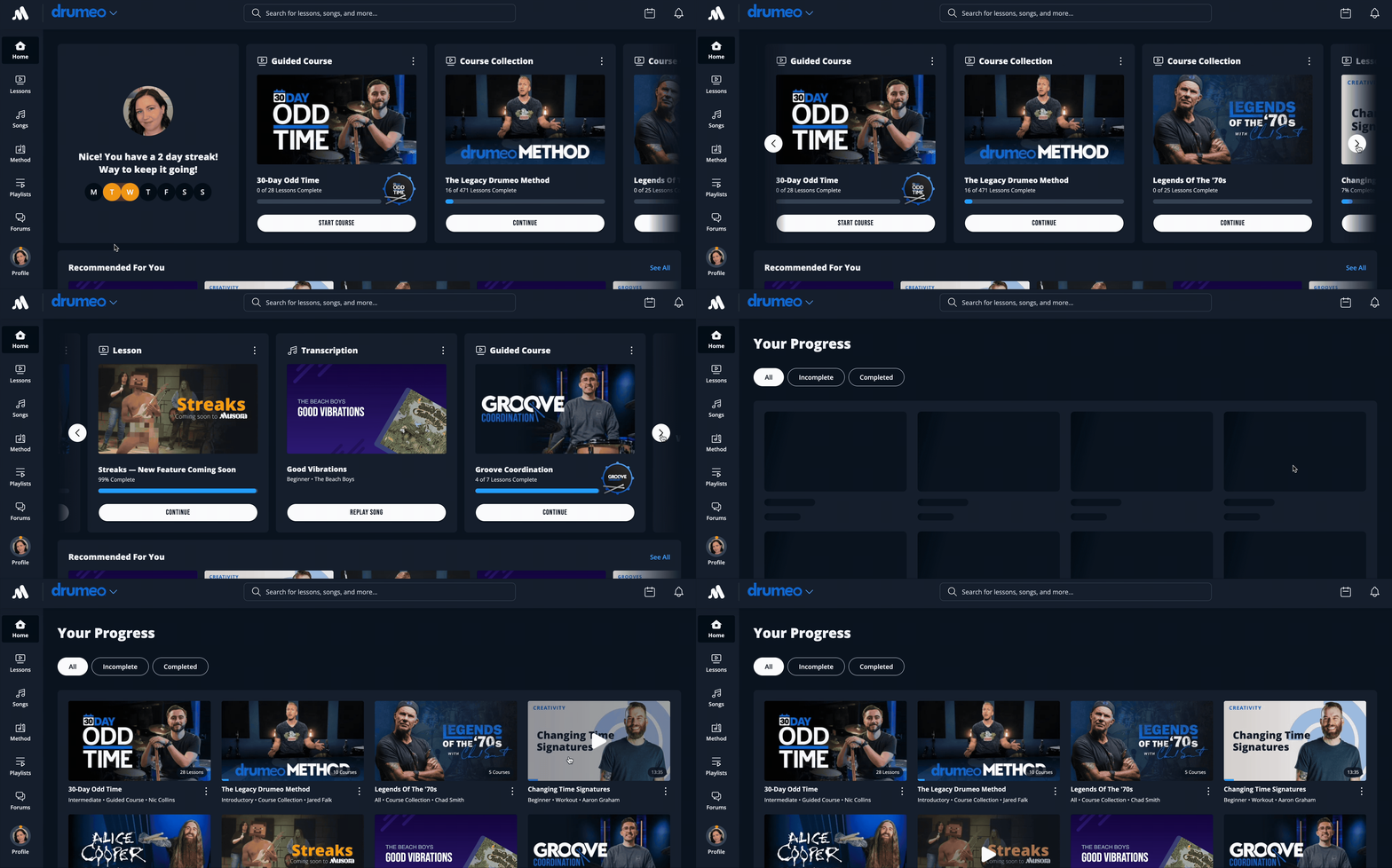
- Go to Lessons → Explore All
- Under Type, click the Courses checkbox
- Deselect Courses and Course Collections to only see Guided Courses
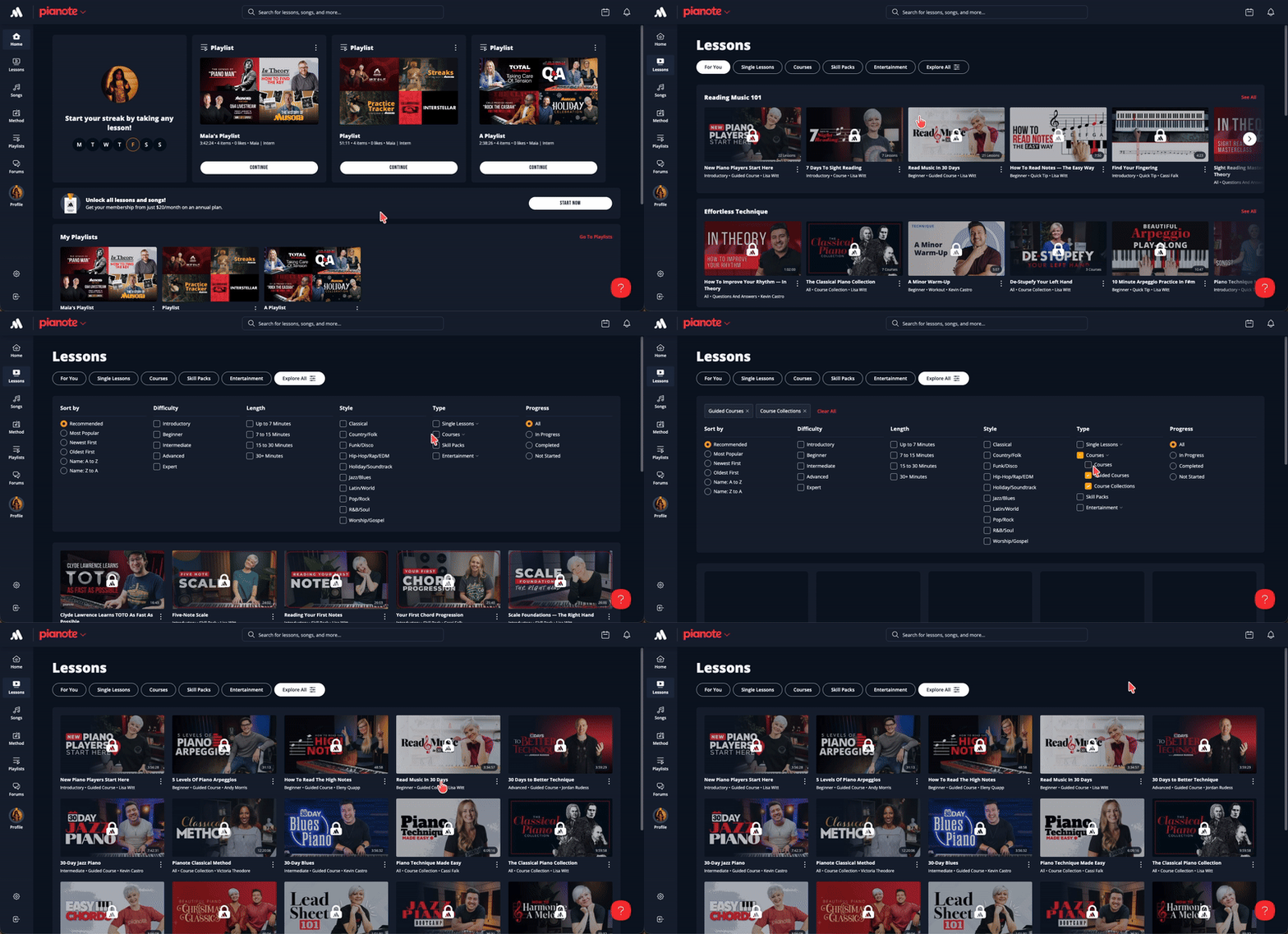
To find Courses, click or tap Lessons, then Courses at the top of the screen.
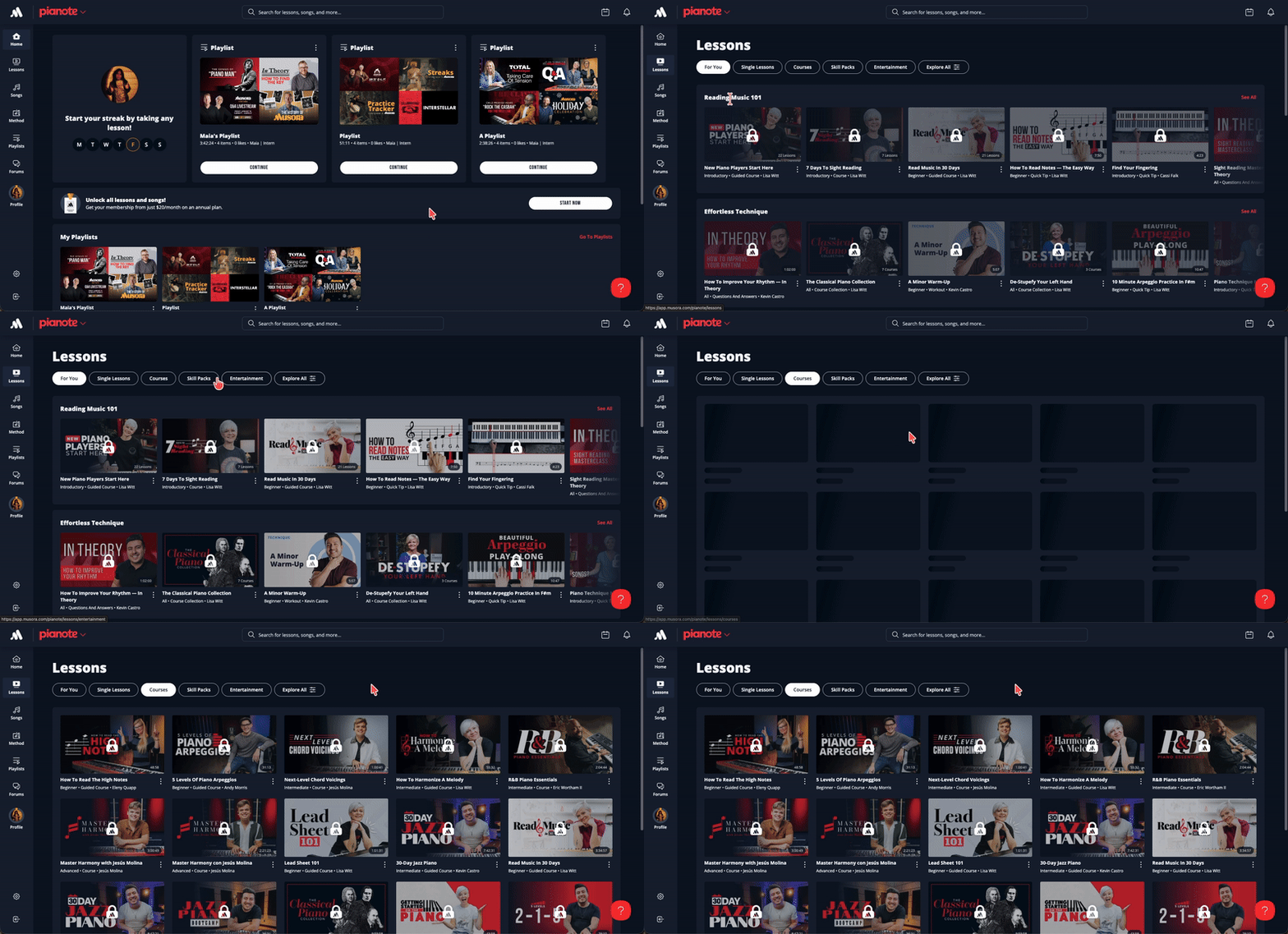
- To find Packs, go to Lessons → Explore All
- Under Type, click the Courses checkbox
- Deselect Courses and Guided Courses to only see Course Collections
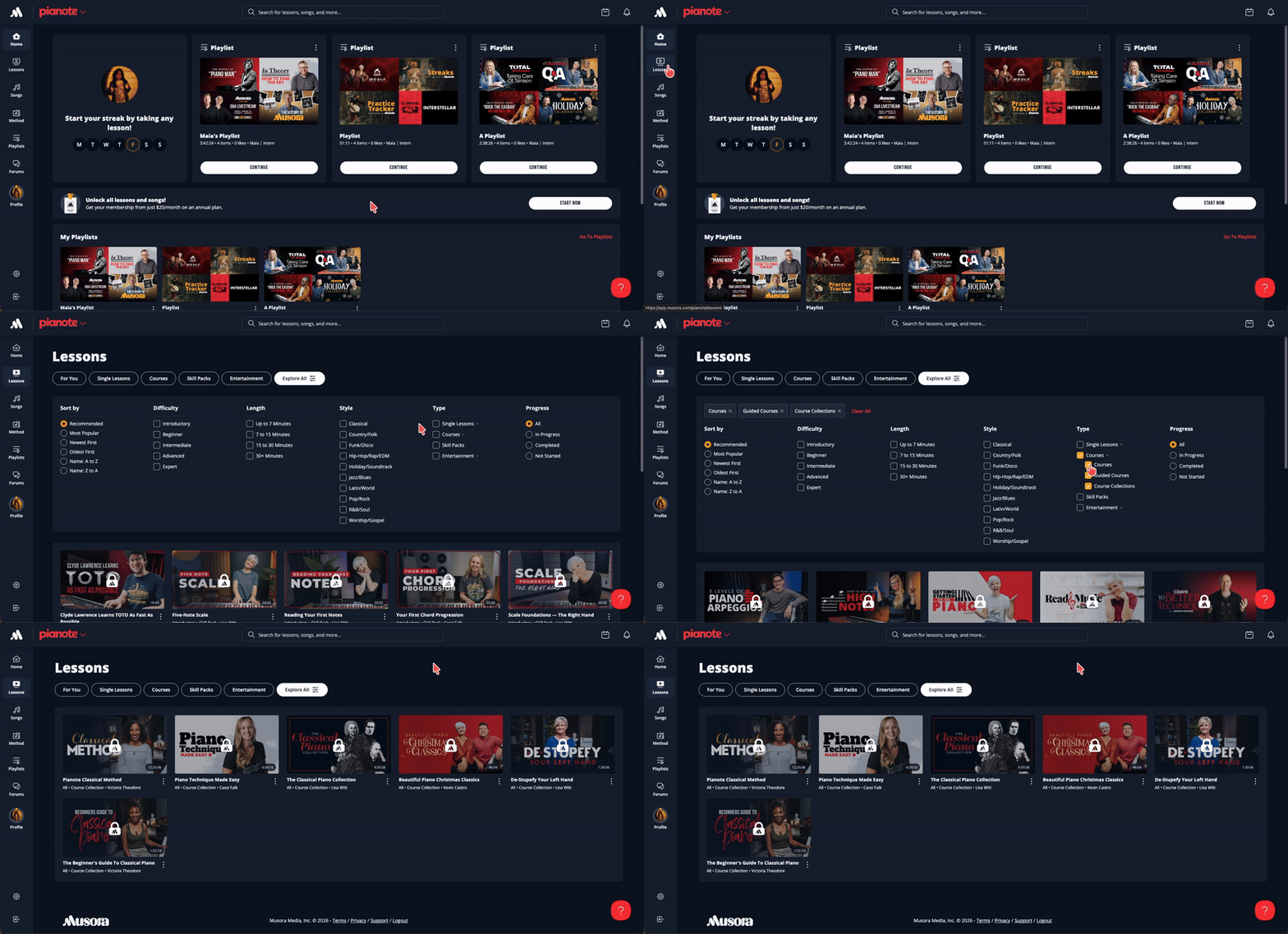
- Click or tap Lessons → Explore All
- Under Type, click Single Lessons
- Deselect Lessons, Live Archives, and Student Archives to only see Practice Alongs
Note: The content card is still labeled as a Workout
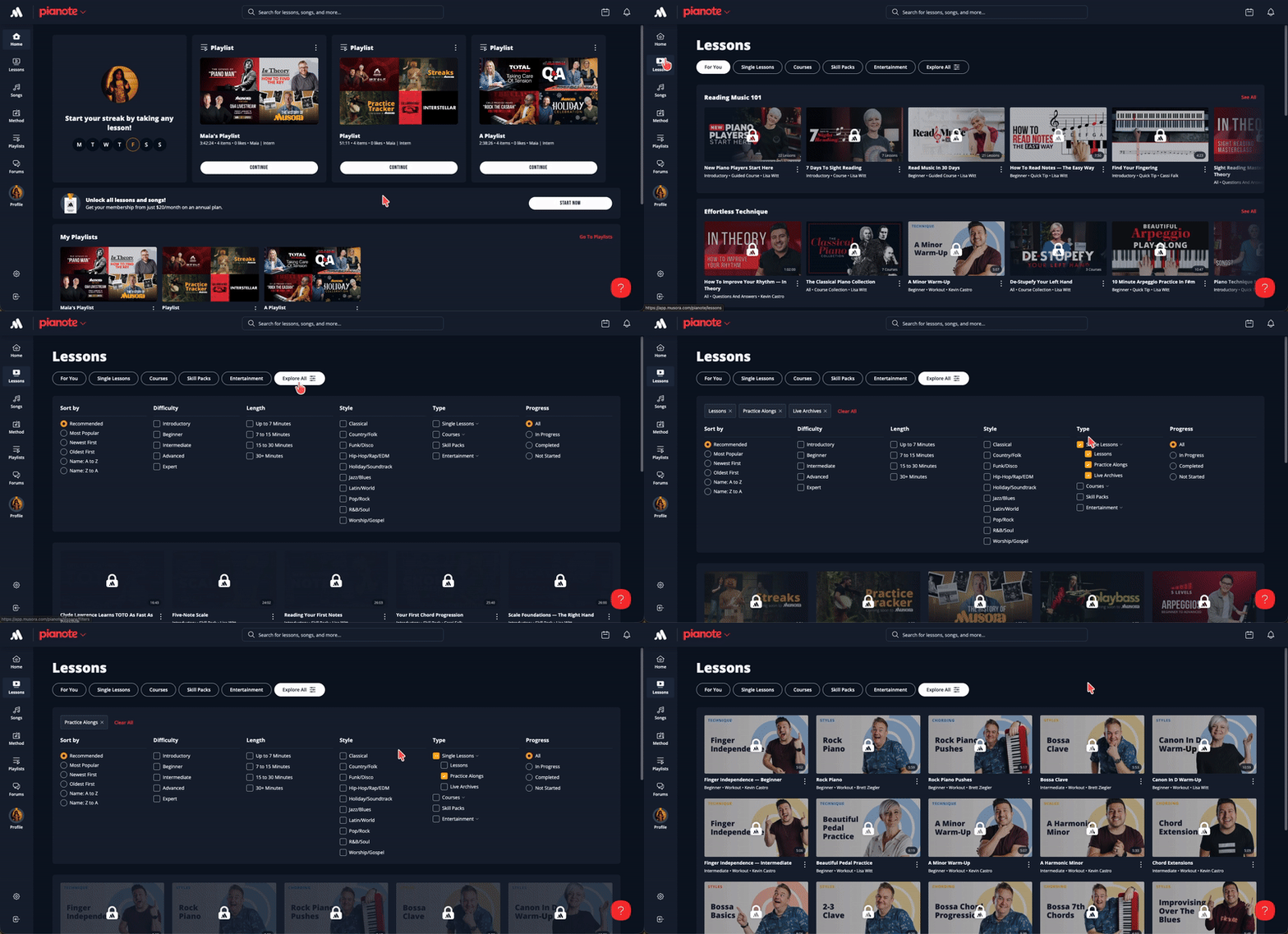
Click or tap Lessons, then click Single Lessons at the top of the screen.
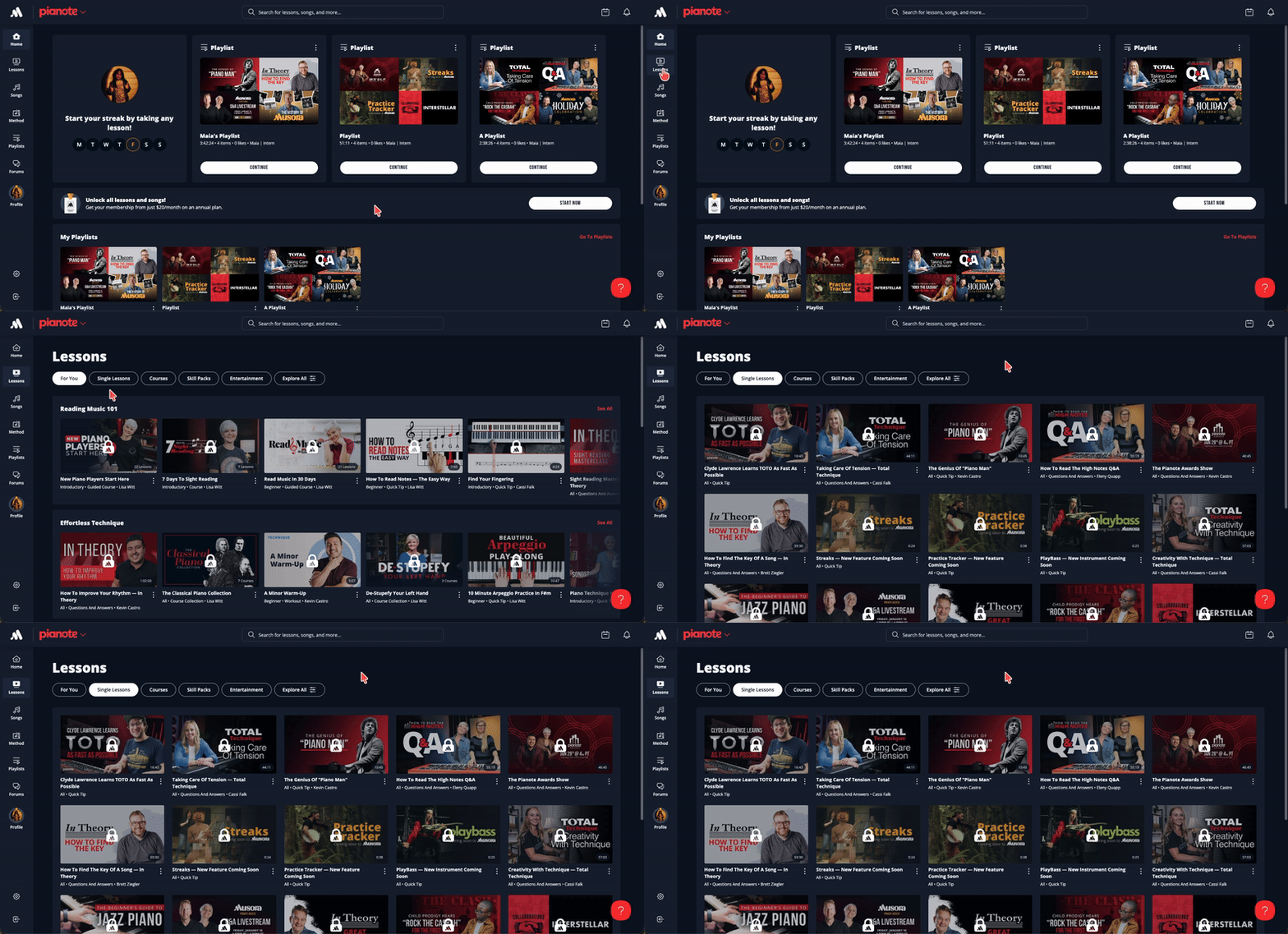
Click or tap Songs, then Tutorials at the top of the screen.
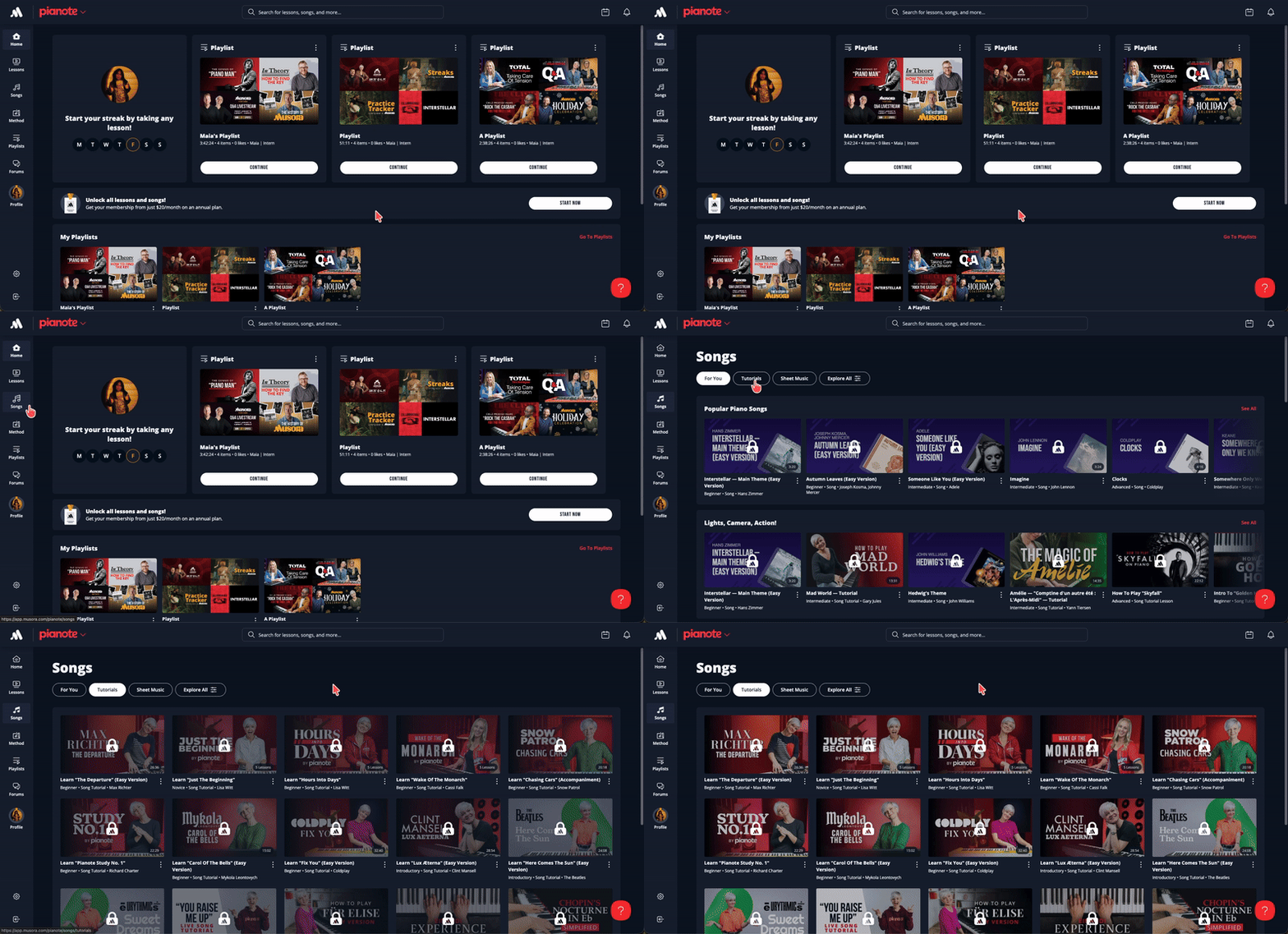
To find them, click Songs, then Transcriptions or Play-Alongs at the top of the screen.
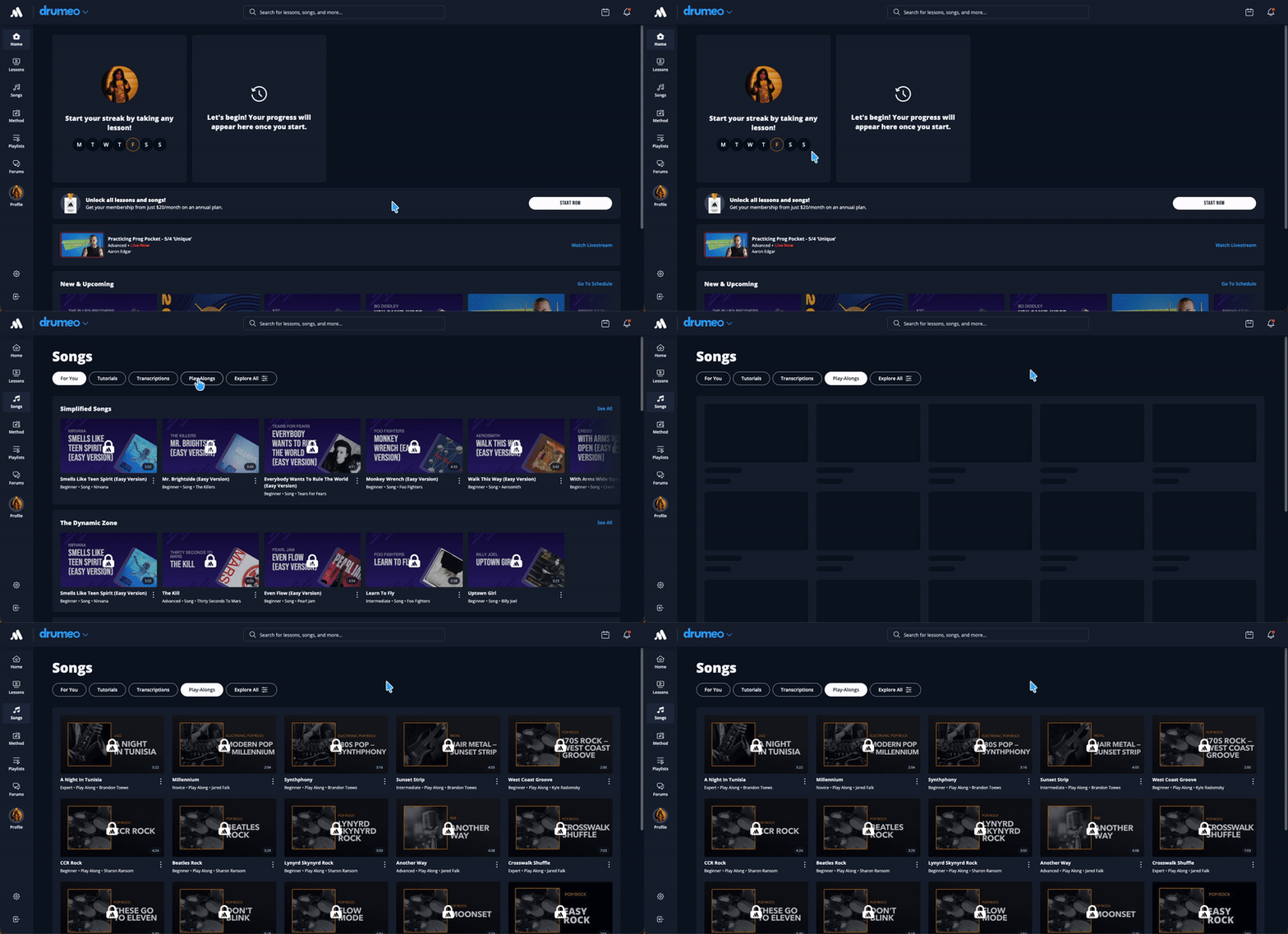
You can also find individual songs by title using the search bar. Or you can use the Explore All button to filter the song library by genre, skill level, and more.
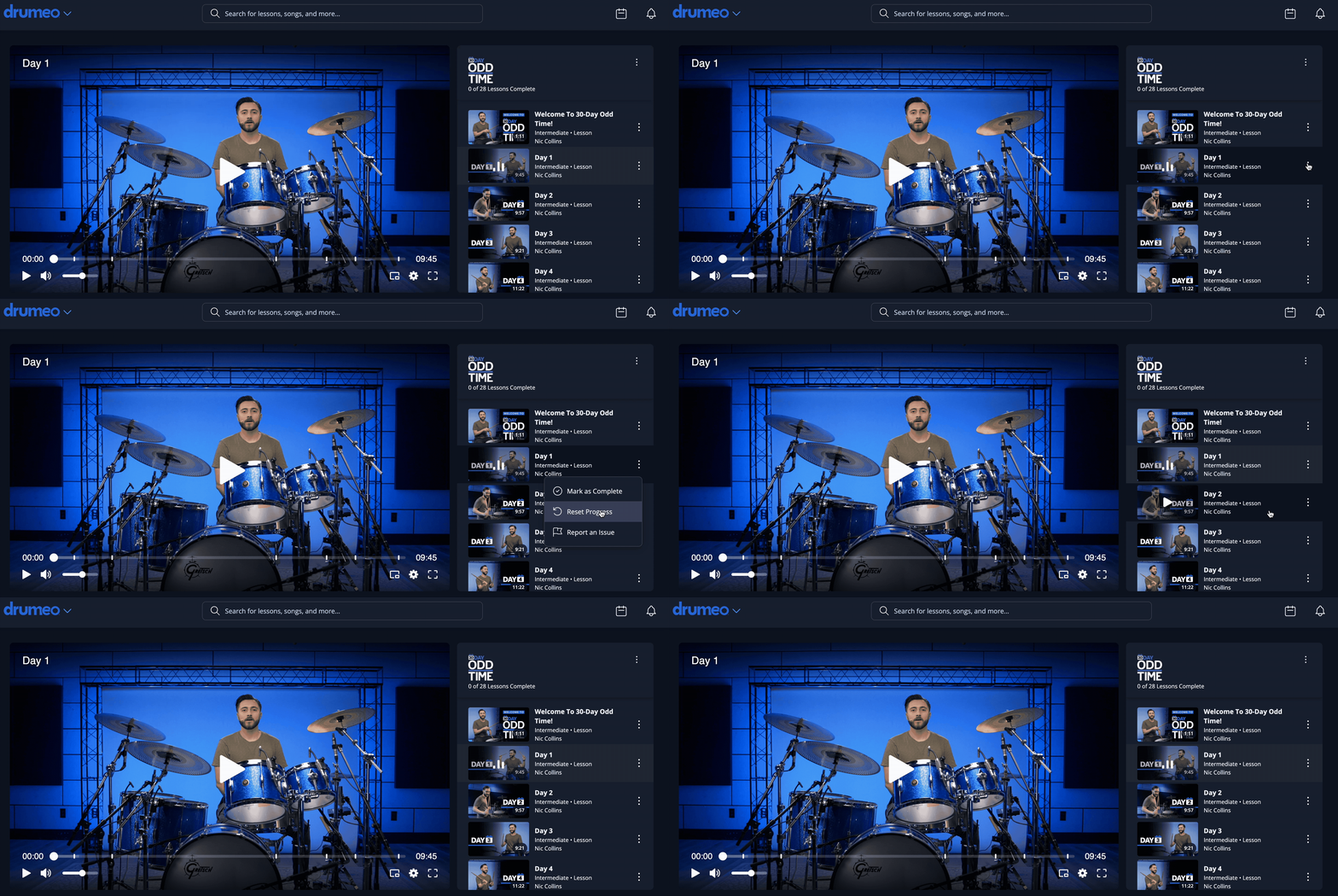
There are also a couple of ways to see which livestreams are coming up. On the homepage, you can scroll down to the New & Upcoming section. Or, from your computer, you can click the little calendar icon in the top right of the screen for the schedule. On the app, just tap the "3-line" menu and then tap Schedule.
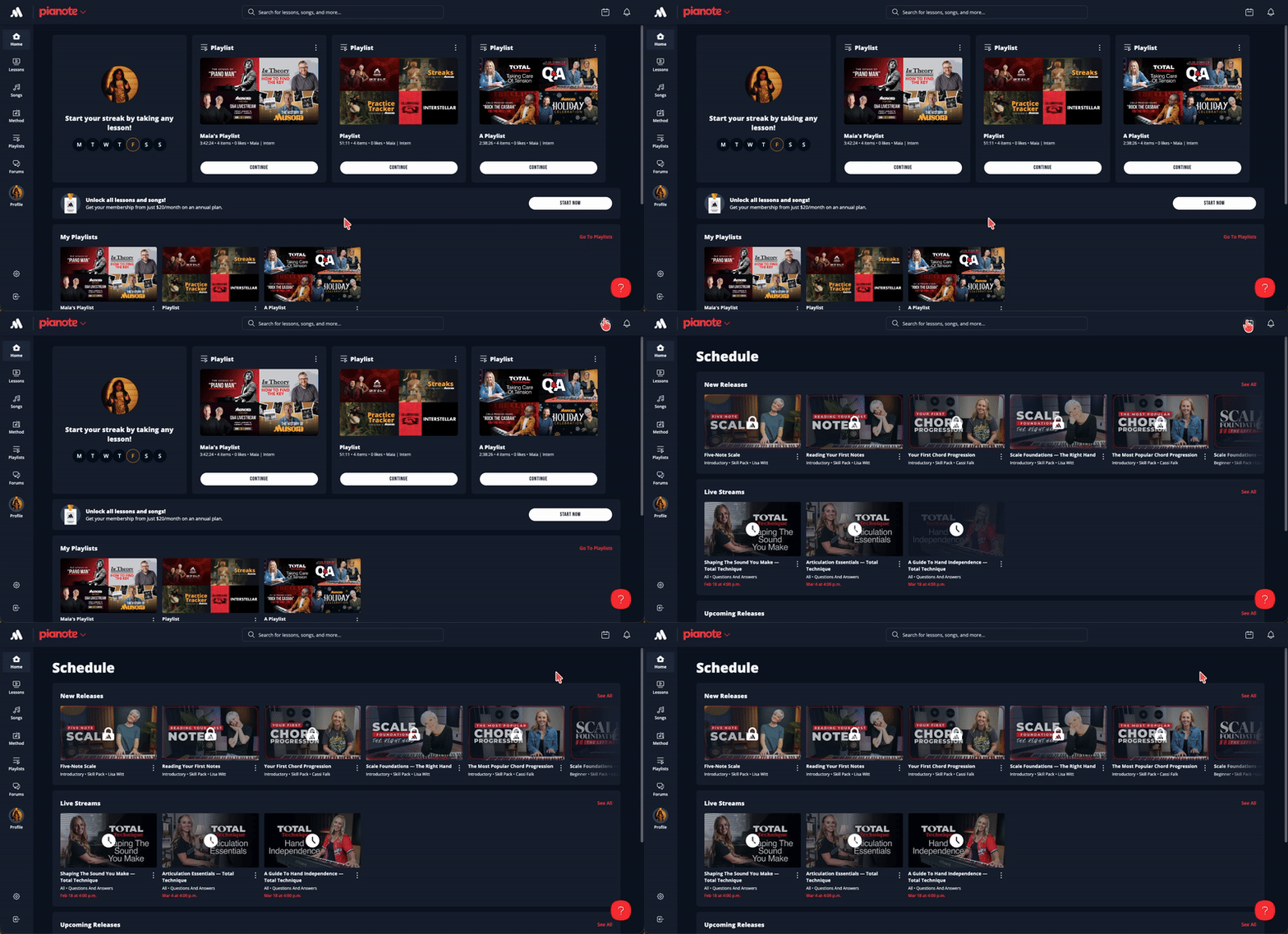
- Click or tap Lessons → Explore All
- Under Type, click Single Lessons
- Deselect Lessons, Practice Alongs, and Student Archives to see only Live Archives
- Click or tap Lessons → Explore All
- Under Type, click Single Lessons
- Deselect Lessons, Practice Alongs, and Live Archives to see only Student Archives
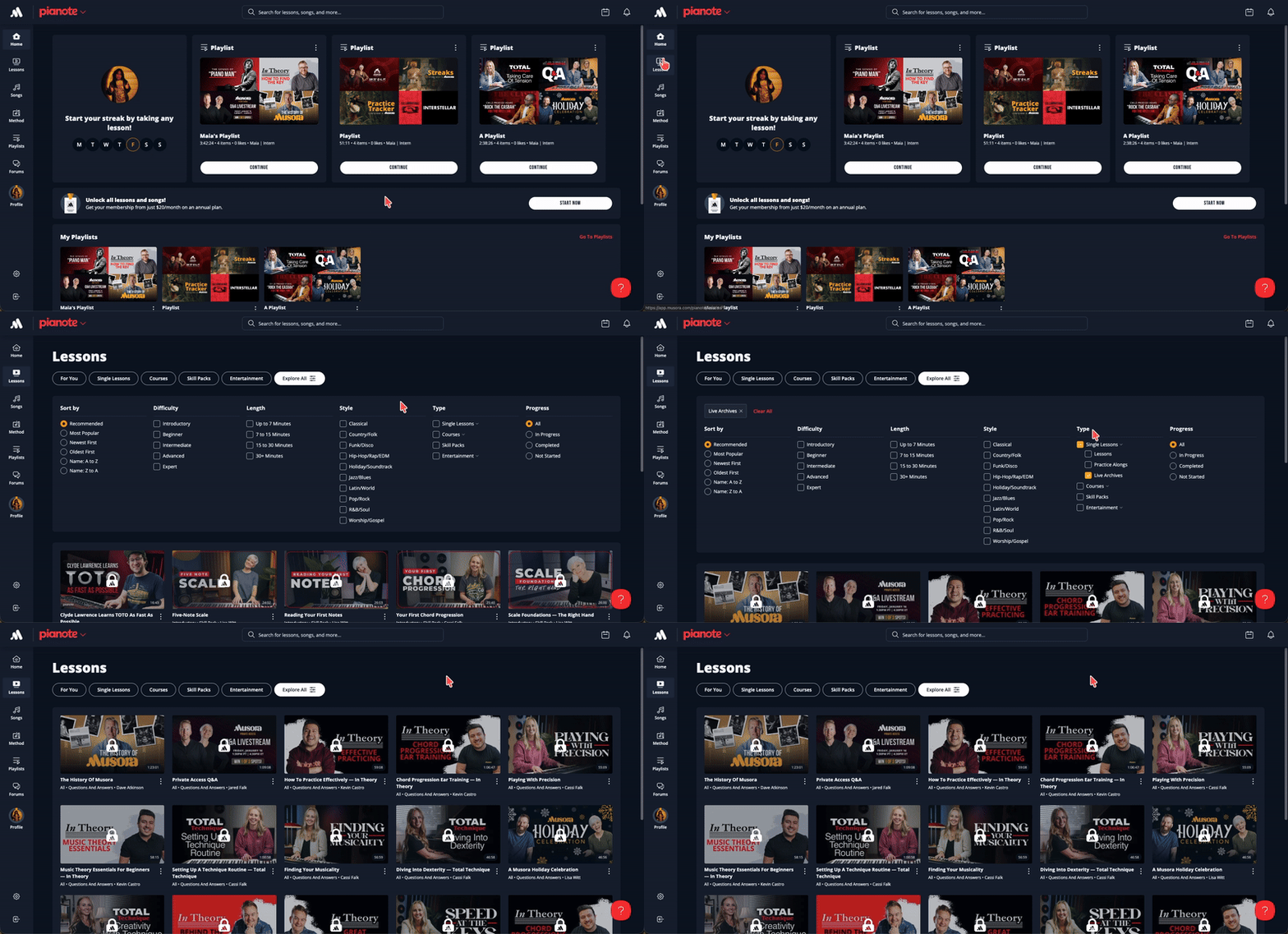
- Click or tap Lessons → Explore All
- Under Type, click Entertainment
- Deselect Specials and Documentaries to see only Shows
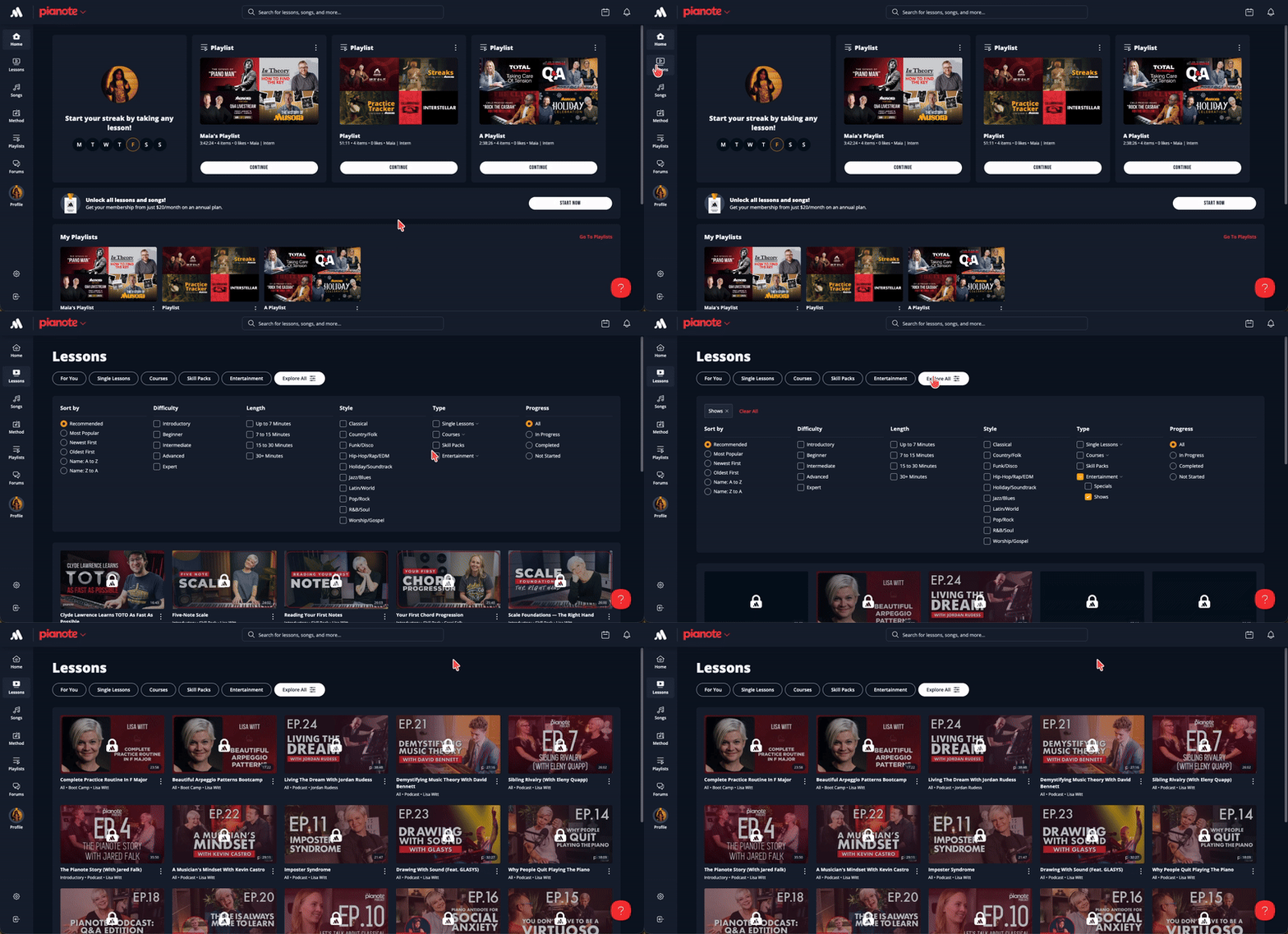
- Click or tap Lessons → Explore All
- Under Type, click Single Lessons
- Deselect Lessons, Live Archives, and Student Archives to see only Practice Alongs
But your XP is not lost! If you've earned XP, you're getting a permanent, personalized award to commemorate your effort. You can find this award in your profile.
CLICK HERE TO LEARN MORE ABOUT XP SUNSETTING
If it's still not coming up, feel free to reach out to the team at [email protected]. We'll do our best to help you!
PlayBass is already included in your Musora membership. On your computer, click the current instrument name at the top left of your screen, which opens a dropdown. Then choose PlayBass! On the app, tap the "3-line" menu, then where it says "Tap here to switch instruments" to get to PlayBass. Now start grooving.
CLICK HERE TO LEARN MORE ABOUT PLAYBASS
- Do any kind of practice to start a streak (this includes lessons, livestreams, songs, or offline sessions)
- Streaks are automatically logged in your Practice Tracker
- Practice every day to maintain your daily streak
- Keep your weekly streak going by practicing at least once a week
- Keep building your streak with any lesson, song, livestream, or offline practice
You'll see your streak right on your homepage! Or, if you want more detailed streak info and stats at a glance, you can find them on your Profile page.
To access your Profile page on the app, tap on your picture at the bottom of the screen. Or, use the "3-line" menu at the top. To access your profile on the website, click "Profile" on the side nav bar.
CLICK HERE TO LEARN MORE ABOUT STREAKS
All of your practice is automatically logged in the Practice Tracker. All you have to do is start any lesson to activate the Practice Tracker.
If you're doing a custom practice (a music book, jam session, etc.), you can add the session manually:
- Go to your Profile page
- Under Today's Practice, click the Add Custom Item button
- Enter your practice details and click Create
You can also add notes to your daily practice to keep track of challenges, successes, or anything else you want to remember.
To see your Practice Tracker calendar and stats, go to your Profile page. You can click on each day to see how long you practiced, and what you worked on!
CLICK HERE TO LEARN MORE ABOUT THE PRACTICE TRACKER
- Interleaved practice: Rotate between different skills – rhythm, technique, and musicality – so learning always feels engaging and exciting.
- Spaced practice: Revisit those same skills over time to help them really stick.
Once you've started a Learning Path, you'll see a set of three lessons to work on each day. All you have to do is follow the path! No more guesswork on what to practice next.
The Learning Paths that are currently available are beginner-level only. So if your skills are a bit more advanced, you'll want to check out some of the other fantastic lessons on the app. But stay tuned – higher level Learning Paths are on the way!
If you have, you'll be given the option to keep that progress or start the Learning Path over from the beginning. For the most effective and complete experience, we recommend starting the path from scratch!
Lisa explains the "method behind the Method" here: CLICK TO LEARN MORE
(If you prefer the previous Method, you can find it by clicking Method in the menu, and scrolling down to Previous Curriculum → 2020 Method.)
(In some of the promotional videos, you might see a goal of 15 minutes per day. Don't worry about that – the goal was updated after the videos were filmed. 12 minutes is the correct amount!)
CLICK HERE TO LEARN MORE ABOUT THE NEW PERSONALIZED EXPERIENCE
Still got questions? Get in touch with our team at [email protected] and we'll do our best to take care of you!
MAKE SOME NOISE
The new experience is available now.
/marketing/musora/membership/the-new-musora-app/make-noise.png)